Postingan

How the Ear Works

Gambar
Like a microphone, the ear is a transducer. Our ears convert acoustic sound vibrations into mechanical energy which is then sent to our brains as electrical impulses. The human ear is made up of the outer, middle, and inner ear. The bones in our middle ear help amplify sound, while the inner ear's muscles help protect it from loud or sudden volume changes. In the previous chapter, frequency was divided into three areas: the bass, or lows, from 20 to 200 Hz; midrange frequencies from about 200 Hz to 5 kHz; and treble, or highs, from 5 to 20 kHz. Most humans hear best in the following order: midrange, highs, and then lows. However, as volume increases, the different frequency ranges are heard more equally. According to the Fletcher–Munson curve, most humans will hear all frequency ranges equally between 80 and 85 dB. It is important to understand what frequencies will be heard at any given volume. When you are in the studio monitor mixes at both lower and higher volumes to ...

What is Sound?

Gambar
Sound is a vibration or a series of vibrations that move through the air. Anything that creates the vibrations, or waves, is referred to as the source. The source can be a string, a bell, a voice, or anything that generates a vibration within our hearing range. Imagine dropping a stone in water. The stone (source) will create a series of ripples in the water. The ripples (waves) are created by areas of dense molecules that are being pushed together as sparse molecules expand, thus creating flatter areas. Sound travels just like this, by compression and rarefaction. Compression is the area where dense molecules are pushed together and rarefaction is the area where fewer molecules are pulled apart, or expanded, in the wave. The compression area is higher in pressure and the rarefaction area is lower in pressure. Seven Characteristics of Sound You may already know about amplitude and frequency. If you have ever adjusted the tone on your amp or stereo, then you have turned up or...

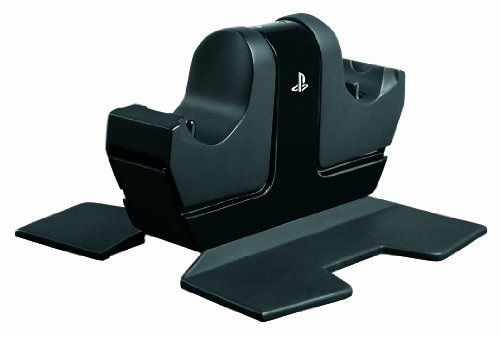
PowerA DualShock 4 Controller Charging Station for PlayStation 4

Gambar
I had a Nyko drop-in charging cradle for my Xbox 360 controllers for a couple of years and always loved the convenience of being able to leave the controllers in the cradle when not in use and have them available with a full charge at any time. Alas, the relatively short battery life compared to rechargable AAs eventually made me give up a little convenience for the much longer battery life. I never saw any need for something of this nature with my PS3 controllers, as their 30-hours on a charge battery life made charging the battery a once a week at most affair. The 4-hour charge of the Dualshock 4 is a different story. An easy to use daily charging solution was needed. For awhile I used a 4-port USB hub located on the table next to my seating area, but the frequent use of the micro-USB port worried me when it came to the frequent charging required of this generation of controller. I looked at the various cradle types of chargers and found most had a feature that wasn't to my likin...

DualShock 4 Wireless Controller for PlayStation 4 - Jet Black

Gambar
First of all, there is no such thing as a perfect game controller. As soon as you optimize things for one type of game and/or one type of player it will be suboptimal for other types of games or players. I have been playing video games since 1977 and have played or owned almost every game system since the Atari VCS 2600. I have used the stock controllers, many aftermarket controllers, and even made and played a few custom controllers and in the few hours since my Dualshock 4 arrived I have held it in my hands, (carefully) opened it and looked at the fabulous internal design, and used it with my PS3. In my short time with it and mentally comparing it to everything else I can honestly say that this is the best, most comfortable joypad so far (the Valve Steam controller is in Beta still, so it will be awhile before this promising looking device is out). Second, I am not, repeat NOT a fanboy (O.K. I was one in the past, first Atari, then Nintendo, and even championed the ill fated Dreamcas...

Netgear High Speed DOCSIS 3.0 Cable Modem (CM400-1AZNAS)

Gambar
I was recently given the opportunity to test and evaluate Netgear’s CM400-1AZNAS DOCIS 3.0 Cable Modem.* after putting the equipment through its paces, I’ve jotted down a number of thoughts: Packaging – Non-descript brown box with an egg crate-like tray to hold the modem, feet, power cube and cord, shielded ethernet cable, installation manual, and notices. Decidedly no frills but it works. Physical description and Build Quality – This thing is tiny! It’s significantly smaller than the current Time Warner Cable box we have. The Netgear modem is smaller than a Blu-Ray case and about an inch thick. As far as ports, it’s a very simple affair with a coaxial jack, power port, and ethernet port. The only physical button is the reset button on the rear. On the front you have a number of indicator lights for power, uplink, downlink, internet, and ethernet. Overall, the unit has decent build quality. Setup – If you’re on Xfinity, setup is a breeze. You don’t even need to contact them to activ...

Arris SURFboard SB6121 DOCSIS 3.0 Cable Modem (Certified Refurbished)

Gambar
The box says refurbished, but looks new to me. Came with protective plastic on the front bezel, instructions, cable, power adapter. Best of all, it fired right up and Comcast cable had no problem provisioning it. What else can I say. I works like it was supposed to work. If you are not familiar with cable modems, here are a few things you should know before you lay out your money for one. This type modem is NOT a ROUTER, you will need one if you want any kind of firewall at all between the outside world and your computer. You may also want an Ethernet hub because this modem has only one Ethernet port on the back which is meant to go from the box to your computer and that is it. Since most households now have Smart TV, Smart Phones, Smart Refrigerators etc these devices all require a wireless internet link. This cable modem does not provide any wireless link. That is something you must furnish as well. I have my cable modem hooked up directly to a wireless router. Then I have one Ethern...

Motorola Surfboard SB5100 Cable Modem

Gambar
I got this cable modem for my folks a short while ago rather than have them continue to pay a monthly rental fee to Comcast. I chose the Motorola 5100 based on the reputation of Motorola, the price (although it wasn't as good as this Amazon price), and the technology. Installation was easy with a quick start guide as well as a full manual (on cd). For the price, you can't beat it. It has the latest technology- DOCSIS 2.0 but is backward compatible with the older standards DOCSIS 1.0 and 1.1 used by mostly all cable internet providers. (Please be sure to check with your cable internet provider first before buying any modem to make sure they support the DOCSIS standard and modem you are considering buying.) The Motorola has both USB and Ethernet connections so you can directly hook up 2 computers without having to buy extra networking hardware. Another nice feature is the STANDBY button at the top which you can use to temporarily cut off the internet. Also, it is relatively compa...